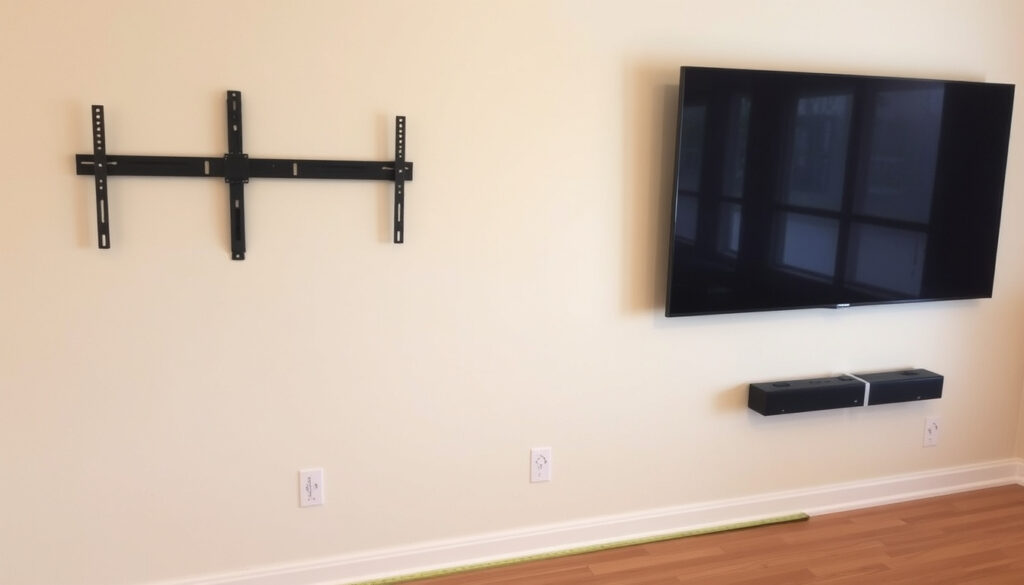
Wall Mount TV Guide: Pros, Cons, and Safe Installation
Walking into a friend’s living room and seeing a TV floating on the wall often sparks the same thought: should I do that too? It’s about more than looks — a properly mounted TV can save floor space, improve viewing angles, and cut down glare. But it also comes with risks: wall damage, hidden cables, and the real possibility of a heavy screen crashing down if the job isn’t done right. This guide walks through the pros, the pitfalls, and the safe way to mount your TV, so you can decide whether to grab a drill or call a pro.
Common TV sizes wall-mounted: 32 to 85 inches ·
Typical VESA patterns: 200×200, 400×400, 600×400 ·
Maximum weight capacity for standard mounts: 50–70 lbs (22–32 kg) for 55-inch TVs ·
Professional installation cost range: $100–$300 ·
Minimum number of wall studs needed: 2
Quick snapshot
- Most modern TVs have VESA mounting holes (TechRadar (tech news site))
- Proper mounting on wall studs is safe (Consumer Reports (nonprofit testing organization))
- TV should not be mounted above a fireplace due to heat damage (The Home Depot (home improvement retailer))
- Exact weight capacity needed for specific TV models (TechRadar)
- Best wall type for mounting without studs (e.g., brick vs. concrete) (The Home Depot)
- Long-term cable concealment options vary by wall type (TechRadar)
- DIY installation typically takes 1–2 hours (Mount-It (mounting accessories brand))
- Professional installation takes 30–60 minutes (The Home Depot (home improvement retailer))
- Check VESA compatibility and TV weight (TechRadar (tech news site))
- Locate studs and choose mount type (Consumer Reports (nonprofit testing organization))
- Decide DIY vs. hire a pro (The Verge (tech publication))
| Label | Value |
|---|---|
| Average TV weight (65 inch) | 50–70 lbs (22–32 kg) |
| Common VESA patterns | 200×200, 300×300, 400×400, 600×400 |
| Typical installation time (DIY) | 1–2 hours |
| Professional installation time | 30–60 minutes |
| Stud spacing standard | 16 or 24 inches apart |
Is it a good idea to wall mount a TV?
Pros of wall mounting
- Saves floor space — no bulky stand needed. PC Richard & Son (electronics retailer) notes that wall mounting frees up room for other furniture.
- Better viewing angle — you can position the screen at eye level when seated, reducing neck strain.
- Reduced risk of tip-over — a mounted TV is far less likely to fall than one on a stand, especially in homes with kids or pets. Consumer Reports (nonprofit testing organization) emphasizes safety.
- Modern aesthetics — a floating TV looks clean and integrated.
Cons of wall mounting
- Wall damage — drilling holes means patching and painting if you move the TV. The Home Depot (home improvement retailer) warns about potential damage.
- Difficult access to ports — once mounted, plugging in a new cable can be a hassle. TechRadar (tech news site) advises attaching all cables before hanging the TV.
- Limited adjustability — fixed and tilt mounts restrict movement compared to a swivel stand. PC Richard & Son (electronics retailer) describes the trade-offs between mount types.
- Potential safety hazards if not installed correctly — a TV falling off the wall can cause serious injury.
Wall-mounted vs. stand comparison
Three factors, one pattern: wall mounting trades flexibility for aesthetics and safety.
| Factor | Wall-mounted | Stand |
|---|---|---|
| Floor space | Zero footprint | Requires surface space |
| Viewing angle | Fixed or tilt only | Swivel and height adjustable |
| Port access | Difficult after mounting | Easy behind/under stand |
Homeowners who prioritize safety and space will lean toward wall mounting. But those who value easy port access and adjustability should stick with a stand — or choose a full-motion mount that adds cost and complexity.
Can any TV be put on a wall mount?
VESA compatibility explained
- Most modern TVs (LCD, LED, OLED, QLED) have VESA mounting holes on the back. TechRadar (tech news site) explains that VESA patterns are measured in millimeters (e.g., 200×200).
- Check the TV’s manual or measure the hole spacing. StarTech.com (manufacturer of mounting hardware) says to verify hole depth and whether the back is flush or inset.
- Mounts come with a range of VESA compatibility. Buy one that matches your TV’s pattern or supports a wider range via adjustable brackets.
Weight and size limits
- Every mount has a maximum weight capacity. A 65-inch TV typically weighs 50–70 lbs (Consumer Reports (nonprofit testing organization)).
- For TVs larger than 75 inches or heavier than 100 lbs, use a reinforced mount rated for the load.
- TechRadar (tech news site) warns that the mount must be rated to bear the load, not just the VESA pattern.
Special cases: curved TVs, OLED, QLED
- Curved TVs require a mount that matches the curvature or uses adjustable arms. Most standard mounts work with the VESA holes.
- OLED and QLED TVs are often thinner and lighter, but their delicate screens need careful handling. The Verge (tech publication) advises attaching mounting bars to the TV first and using spacers if needed.
Almost any TV can be wall-mounted as long as the VESA pattern matches and the mount supports the weight. The exception: very old, non-flat TVs without VESA holes — those need a different approach.
Can I wall mount my TV myself?
Required tools and materials
- Consumer Reports (nonprofit testing organization) lists: stud finder, drill, level, tape measure, and screwdriver.
- Mount-It (mounting accessories brand) adds: pilot bits, socket wrench, and possibly a helper for larger TVs.
Step-by-step mounting process
- Choose the location and height. The Home Depot (home improvement retailer) recommends using a paper cutout of the TV to test placement.
- Locate studs with a stud finder. Standard spacing is 16 or 24 inches on center.
- Mark pilot holes and drill them. Consumer Reports (nonprofit testing organization) says to drill into the center of the studs.
- Attach the wall bracket to the studs using lag bolts.
- Attach the mounting bars to the TV. The Verge (tech publication) suggests attaching cables to the TV first.
- Hang the TV on the bracket and secure it. Mount-It (mounting accessories brand) says to insert the locking pins or screws.
- Level the TV and tighten all bolts.
Risks of DIY mounting
- Missing studs can lead to the TV falling. The Home Depot (home improvement retailer) stresses using a weight-bearing wall.
- Drilling into electrical wires or plumbing in the wall is a real hazard.
- Improper leveling results in a crooked TV.
When to call a professional
- If you’re unsure about the wall type (brick, concrete, plasterboard). TechRadar (tech news site) recommends professional help for non-standard walls.
- If the TV is very large or heavy (over 70 lbs).
- If you need to run cables through the wall (may require an electrician).
- Professional installation costs $100–$300 and typically takes 30–60 minutes (The Home Depot (home improvement retailer)).
DIY is safe for a confident handyman with a stud finder and a level. But one mistake — a misaligned stud or an overtightened bolt — can turn your TV into a hazard. The cost of a pro is often less than the damage a falling TV causes.
What are the disadvantages of wall mounted TV?
Limited adjustability vs. stands
- Fixed and tilt mounts lock the viewing angle. PC Richard & Son (electronics retailer) notes that full-motion mounts add flexibility but cost more and require deeper stud clearance.
- If you rearrange furniture, you may need to reposition the mount.
Cable management challenges
- Cables can dangle if not managed. PC Richard & Son (electronics retailer) suggests cable covers or in-wall conduits (which may need an electrician).
- Accessing ports becomes a hassle — you may need to unmount the TV to plug in a new device.
Wall damage and immobility
- Drilling holes is permanent; patching and painting are required if you remove the mount.
- A mounted TV is not easily moved between rooms. Consumer Reports (nonprofit testing organization) warns that moving a mounted TV requires re-drilling new holes.
Heat issues above fireplace
- The Home Depot (home improvement retailer) explicitly warns against mounting above a fireplace because heat can damage the TV’s electronics.
- Even with a heat shield, prolonged exposure to high temperatures reduces lifespan.
The biggest hidden cost of wall mounting is immobility. If you’re the type who changes the room layout every few months, a stand may be the smarter choice. If you want a clean, permanent setup, wall mounting delivers.
Where shouldn’t you mount a TV?
Above a fireplace
- Heat and smoke can damage the TV. The Home Depot (home improvement retailer) says it’s a common mistake.
- Viewing angle is often too high, causing neck strain. PC Richard & Son (electronics retailer) recommends the bottom of the TV at seated eye level.
Exterior walls with poor insulation
- Condensation inside the wall can damage electronics. TechRadar (tech news site) advises checking for insulation before drilling.
- Temperature swings affect performance.
Direct sunlight spots
- Sunlight creates glare and can overheat the TV. The Home Depot (home improvement retailer) recommends avoiding direct sunlight.
Corners with limited stud access
- Corner walls often have fewer studs. Without two studs for support, the mount may not be secure. Consumer Reports (nonprofit testing organization) says to look for two studs.
- If only one stud is available, use a mount designed for single-stud installation, but verify weight capacity.
The safest locations are interior walls with standard stud spacing. If you’re set on a tricky spot — above a fireplace or on a brick wall — hire a professional to assess the structure and install appropriate anchors.
Pros and cons of wall mounting
Upsides
- Floor space savings
- Improved viewing angle
- Reduced tip-over risk
- Clean, modern look
Downsides
- Wall damage
- Difficult port access
- Limited adjustability
- Potential safety hazards if installed incorrectly
Spec table: VESA patterns and weight limits
Five common VESA patterns, one rule: the mount must support both the pattern and the weight.
| VESA pattern (mm) | Typical TV size | Max weight (approx) |
|---|---|---|
| 200×200 | 32–50 inch | 35 lbs (16 kg) |
| 300×300 | 43–55 inch | 50 lbs (23 kg) |
| 400×400 | 55–65 inch | 70 lbs (32 kg) |
| 600×400 | 65–75 inch | 100 lbs (45 kg) |
| 800×600 | 75+ inch | 120 lbs (54 kg) |
Data compiled from StarTech.com (manufacturer of mounting hardware) and TechRadar (tech news site).
What’s confirmed and what’s unclear
Confirmed facts
- VESA compatibility is standard for most TVs (TechRadar (tech news site)).
- Proper mounting on studs is safe (Consumer Reports (nonprofit testing organization)).
- TV should not be mounted above a fireplace due to heat (The Home Depot (home improvement retailer)).
- Studs are typically 16 or 24 inches apart (The Home Depot (home improvement retailer)).
- Attach cables before hanging the TV (TechRadar (tech news site)).
What’s unclear
- Exact weight capacity needed for specific TV models (varies by brand).
- Best wall type for mounting without studs (brick vs. concrete vs. plasterboard).
- Long-term reliability of single-stud mounts for heavy TVs.
- Effectiveness of heat shields above fireplaces.
Expert perspectives
“If you’re handy and have a stud finder, DIY is totally doable for a 55-inch TV. But for anything larger or on a brick wall, call a pro. The cost of a falling TV is way higher than the installation fee.”
— Professional TV installer, The Verge (tech publication)
“Our testing shows that a properly mounted TV is far safer than one on a stand when it comes to tip-over hazards. The key is to use the right mount and follow the installation steps to the letter.”
— Consumer Reports, Consumer Reports (nonprofit testing organization)
“Cable management is the number one complaint we hear from customers after installation. Plan for it before you mount — use a cable cover or run wires through the wall.”
— PC Richard & Son, PC Richard & Son (electronics retailer)
Summary
Wall mounting a TV is a smart move for space and safety — but only if done correctly. The risks are real: wall damage, cable headaches, and a potential crash. For homeowners in the US, the choice is clear: invest in a proper mount and a stud finder, follow the step-by-step guides from trusted sources, and consider hiring a professional if the TV is large or the wall is tricky. The alternative — a TV on a stand — is safer and more flexible, but takes up space and looks less sleek. Whichever route you choose, the decision hinges on your wall type, your tools, and your willingness to drill.
Related reading: Wall Mounted vs. Stand TVs Pros Cons and Setup Tips · How to Wall-Mount Your TV
Frequently asked questions
How much does it cost to wall mount a TV?
Professional installation typically costs $100–$300, depending on the wall type and TV size. DIY costs $20–$80 for a mount and tools.
Can I mount a TV on plasterboard?
Yes, but you must use toggle bolts or drywall anchors rated for the TV’s weight. However, The Home Depot (home improvement retailer) recommends mounting into studs whenever possible.
What tools do I need to wall mount a TV?
Basic tools: stud finder, drill, level, tape measure, screwdriver, and socket wrench. Consumer Reports (nonprofit testing organization) has a full checklist.
How high should I mount my TV?
PC Richard & Son (electronics retailer) recommends the bottom of the TV at seated eye level, and the top no higher than standing eye level.
Can I mount a TV above a fireplace?
It’s not recommended due to heat damage. The Home Depot (home improvement retailer) and Consumer Reports (nonprofit testing organization) advise against it.
What is VESA and why does it matter?
VESA is the standard hole pattern on the back of a TV. It must match the mount’s pattern. TechRadar (tech news site) explains how to measure it.
Is it safe to mount a TV on a brick wall?
Yes, with the right tools (masonry drill bits and anchors). TechRadar (tech news site) says to use a hammer drill and expansion anchors. Professional help is recommended for brick walls.
More related posts
 Avis de décès Journal de Québec: How to Find Death Notices
 Alina Habba: Age, Ethnicity, Marriages, Career & Resignation
 Lorenzo Lamas Biography, Net Worth, and Current Life
 Peter Crouch: Height, Wife, Net Worth, and Career Stats
 Canada Child Benefit July 2025: New Payment Amounts
 Karaoke Songs Album Songs: Top 100 Picks & Playlists
 Anya Taylor-Joy Movies and TV Shows: Complete Filmography
 Malcolm Gladwell: Books, Quotes, and Controversies